Search the library
The filter works in your browser and sends nothing anywhere. With it switched off, every row below still shows.
| Model | Shows | In short | The lift | Where it says so |
|---|---|---|---|---|
| Acorn 130 | C1-C5 | Charging | Moves | Manualp.24 |
| Acorn 130 | C6 | Fully charged | Moves | Manualp.24 |
| Acorn 130 | C7 | Charger voltage low | Moves | Manualp.24 |
| Acorn 130 | C8 | Charger voltage high | Moves | Manualp.24 |
| Acorn 130 | C9 | Battery not found or faulty | Moves | Manualp.24 |
| Acorn 130 | blank | No power, or asleep | Varies | Manualp.24 |
| Acorn 130 | A1 | Not charging, beeping | Moves | Manualp.24 |
| Acorn 130 | A2 | Going up (armrest) | Moves | Manualp.25 |
| Acorn 130 | A3 | Going down (armrest) | Moves | Manualp.25 |
| Acorn 130 | A4 | Going up (remote) | Moves | Manualp.25 |
| Acorn 130 | A5 | Going down (remote) | Moves | Manualp.25 |
| Acorn 130 | A9 | Moving the hinge | Moves | Manualp.25 |
| Acorn 130 | E1 | Footrest edge, down side | Stops | Manualp.25 |
| Acorn 130 | E2 | Footrest edge, up side | Stops | Manualp.25 |
| Acorn 130 | E4 | Carriage edge, down side | Stops | Manualp.25 |
| Acorn 130 | E5 | Carriage edge, up side | Stops | Manualp.25 |
| Acorn 130 | E6 | Seat not in riding position | Stops | Manualp.25 |
| Acorn 130 | E7 | Battery low | Stops | Manualp.26 |
| Acorn 130 | E9 | Key switch off | Stops | Manualp.26 |
| Acorn 130 | H1 | Safety circuit 1 to chassis | Stops | Manualp.26 |
| Acorn 130 | H2 | Safety circuit 2 to chassis | Stops | Manualp.26 |
| Acorn 130 | H3 | Hinge not responding | Stops | Manualp.26 |
| Acorn 130 | H6 | Hinge stuck part way | Stops | Manualp.26 |
| Acorn 130 | F1 | Relay fault | Stops | Manualp.26 |
| Acorn 130 | F2 | Brake fault | Stops | Manualp.26 |
| Acorn 130 | F3 | Motor overcurrent | Stops | Manualp.27 |
| Acorn 130 | F5 | Battery flat, alarm | Stops | Manualp.27 |
| Acorn 130 | F6 | Final limit overrun | Stops | Manualp.27 |
| Acorn 130 | F7 | Over-speed governor | Stops | Manualp.27 |
| Acorn 130 | F8 | Down-side edge at the top | Stops | Manualp.27 |
| Acorn 130 | F9 | Up-side edge at the bottom | Stops | Manualp.27 |
| Acorn 180 | blank | Off or asleep | Varies | Manualp.16 |
| Acorn 180 | A1 | Ready, not charging | Moves | Manualp.16 |
| Acorn 180 | A2 | Going up (arm switch) | Moves | Manualp.16 |
| Acorn 180 | A3 | Going down (arm switch) | Moves | Manualp.16 |
| Acorn 180 | A4 | Going up (remote) | Moves | Manualp.16 |
| Acorn 180 | A5 | Going down (remote) | Moves | Manualp.16 |
| Acorn 180 | A9 | Waiting for the hinge | Moves | Manualp.16 |
| Acorn 180 | C1 | Charging | Moves | Manualp.16 |
| Acorn 180 | C4 | Fully charged | Moves | Manualp.16 |
| Acorn 180 | E1 | Footrest edge, down side | Stops | Manualp.16 |
| Acorn 180 | E2 | Footrest edge, up side | Stops | Manualp.16 |
| Acorn 180 | E3 | Under-footrest edge | Stops | Manualp.16 |
| Acorn 180 | E4 | Carriage edge, down side | Stops | Manualp.16 |
| Acorn 180 | E5 | Carriage edge, up side | Stops | Manualp.16 |
| Acorn 180 | E6 | Seat swivelled | Stops | Manualp.16 |
| Acorn 180 | E7 | Battery low | Stops | Manualp.16 |
| Acorn 180 | F5 | Battery flat, alarm | Stops | Manualp.16 |
| Acorn 180 | F7 | Do not hand wind down | Stops | Manualp.16 |
| Stannah 600 | 1 | Charging or battery fault | Varies | Manualp.22 |
| Stannah 600 | 2 | No fault found | Moves | Manualp.22 |
| Stannah 600 | 3 | Something at the footrest or carriage | Stops | Manualp.22 |
| Stannah 600 | 4 | Power key or on/off switch | Stops | Manualp.22 |
| Stannah 600 | 5 | Seat sensor or downside arm | Stops | Manualp.22 |
| Stannah 600 | 6 | Immobiliser seatbelt | Stops | Manualp.22 |
| Stannah 600 | 7 | Seat not in travelling position | Stops | Manualp.22 |
| Stannah 600 | 9 or F | Engineer needed | Stops | Manualp.22 |
| Stannah 600 | LED off | Master switch off | Stops | Manualp.22 |
| Stannah 600 | LED pulsing | Key or on/off switch | Stops | Manualp.22 |
| Stannah 600 | LED on | Ready | Moves | Manualp.22 |
| Handicare 1100 | - | Armrest up or seat turned | Stops | Manualpp.20, 26 |
| Handicare 1100 | 0 | Key off or stop pressed | Stops | Manualpp.19, 26 |
| Handicare 1100 | 1 | Needs charging | Varies | Manualp.26 |
| Handicare 1100 | 2 | Not charging | Varies | Manualpp.21, 26 |
| Handicare 1100 | 3 | Top end limit | Varies | Manualp.26 |
| Handicare 1100 | 4 | Top safety edge | Stops | Manualpp.22, 26 |
| Handicare 1100 | 5 | Bottom end limit | Varies | Manualp.26 |
| Handicare 1100 | 6 | Bottom safety edge | Stops | Manualpp.22, 26 |
| Handicare 1100 | 7 | Battery too low to ride | Stops | Manualpp.22, 27 |
| Handicare 1100 | 8 | Going up | Moves | Manualp.27 |
| Handicare 1100 | 9 | Going down | Moves | Manualp.27 |
| Handicare 1100 | d | Main power relay | Stops | Manualp.27 |
| Handicare 1100 | L | Overload or motor fault | Stops | Manualp.27 |
| Handicare 1100 | o | Control board memory | Stops | Manualp.27 |
| Handicare 1100 | blank | Sleeping | Varies | Manualp.27 |
| Handicare 1100 | self-test | Short start-up test | Moves | Manualp.27 |
| Handicare 1100 | Ir / rF | Remote paired | Varies | Manualp.27 |
| Handicare 1100 | FP | Footplate moving | Varies | Manualp.27 |
| Handicare 1100 | Y | Hardware fault | Stops | Manualp.28 |
| Handicare 1100 | 8. / 9. | Seat swivelling | Moves | Manualp.28 |
| Handicare 1100 | SL / noSL | Slide track found or not | Varies | Manualp.28 |
| Handicare 1000 | blank | Off, or asleep | Varies | Manualpp.21, 25 |
| Handicare 1000 | - | Armrest folded up | Stops | Manualpp.19, 25 |
| Handicare 1000 | 0 | Key, stop button or seat | Stops | Manualpp.18-19, 25 |
| Handicare 1000 | 1 | Needs charging | Varies | Manualp.25 |
| Handicare 1000 | 2 | Off charge | Varies | Manualpp.8, 20, 25 |
| Handicare 1000 | 3 | End limit | Varies | Manualp.25 |
| Handicare 1000 | 4 | Safety edge | Stops | Manualpp.21, 25 |
| Handicare 1000 | 5 | End limit | Varies | Manualp.25 |
| Handicare 1000 | 6 | Safety edge | Stops | Manualpp.21, 25 |
| Handicare 1000 | 7 | Low battery | Stops | Manualp.26 |
| Handicare 1000 | 8 | Going up | Moves | Manualp.26 |
| Handicare 1000 | 9 | Going down | Moves | Manualp.26 |
| Handicare 1000 | C | Remote address fault | Stops | Manualp.26 |
| Handicare 1000 | d | Main power relay | Stops | Manualp.26 |
| Handicare 1000 | E | Main power | Stops | Manualp.26 |
| Handicare 1000 | F | Brake electronics | Stops | Manualp.26 |
| Handicare 1000 | g | Brake not connected | Stops | Manualp.26 |
| Handicare 1000 | H | Relay closed early | Stops | Manualp.26 |
| Handicare 1000 | L | Overloaded | Stops | Manualp.26 |
| Handicare 1000 | n | Half speed | Moves | Manualp.26 |
| Handicare 1000 | o | Control board memory | Stops | Manualp.26 |
| Handicare 1000 | r | Power fault while charging | Varies | Manualp.27 |
| Handicare 1000 | U | Power fault on float | Varies | Manualp.27 |
| Handicare 1000 | Y | Main board fault | Stops | Manualp.27 |
| Handicare 1000 | . | | . | Over current | Stops | Manualp.27 |
| Handicare 1000 | .8. | Sleeping | Varies | Manualp.27 |
Full meanings, the owner check each maker allows and its engineer point: Stannah, Acorn and Handicare.
The codes people type without a make
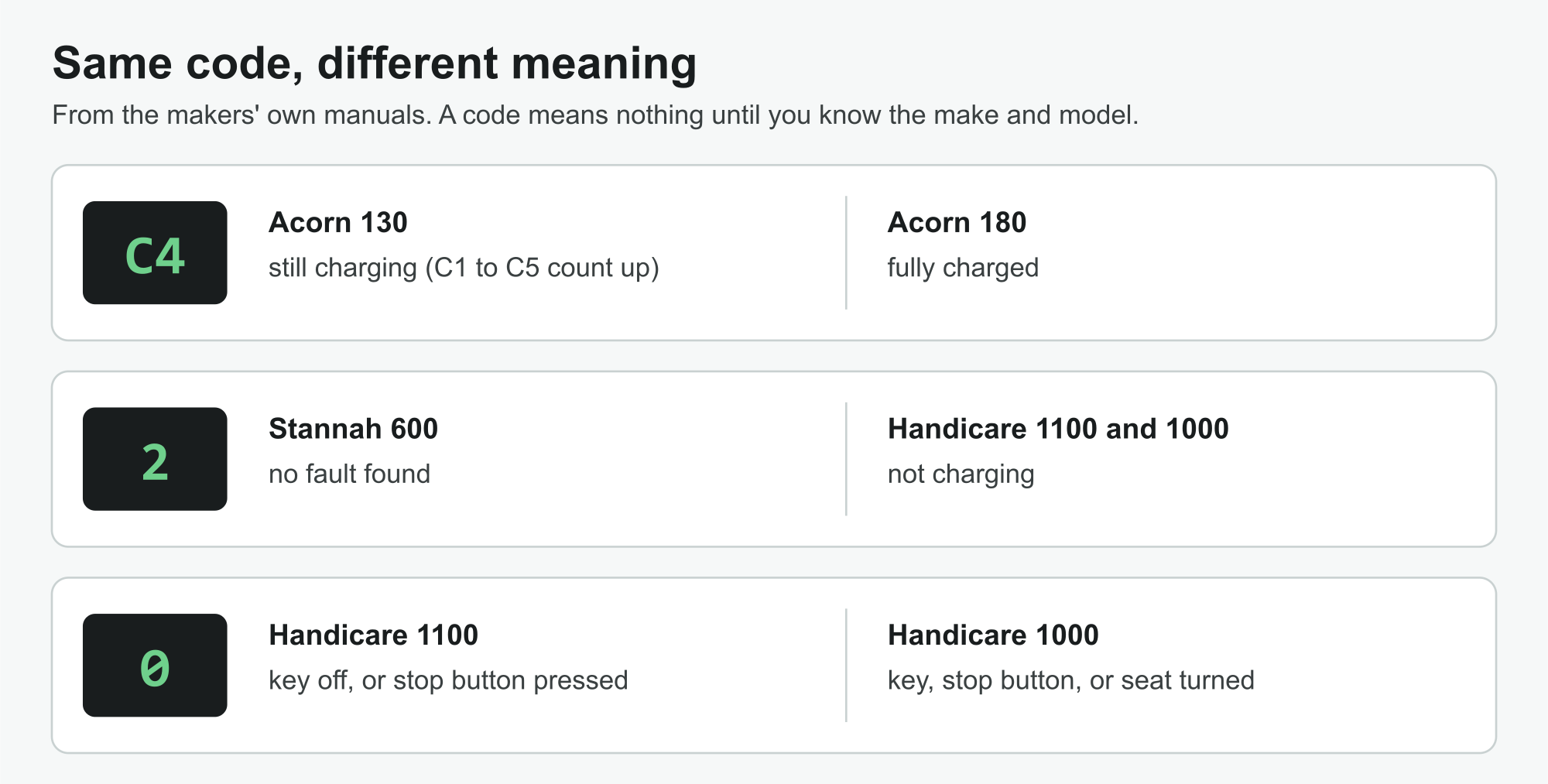
Searches for a bare "A1", "C4", "E9", "2", "6" or "9" are common. Here is what each means on every model whose maker prints it, which shows why the make matters.
| Code | Where it appears, and what the maker says |
|---|---|
| A1 | Acorn 130: not charging, beeping; Acorn 180: ready, not charging. |
| C4 | Acorn 130: charging; Acorn 180: fully charged. |
| E9 | Acorn 130: key switch off. |
| 2 | Stannah 600: no fault found; Handicare 1100: not charging; Handicare 1000: off charge. |
| 6 | Stannah 600: immobiliser seatbelt; Handicare 1100: bottom safety edge; Handicare 1000: safety edge. |
| 9 | Stannah 600: engineer needed; Handicare 1100: going down; Handicare 1000: going down. |
"Stairlift flashing C4"
Only Acorn uses a C4 in the manuals read for this guide, and its two public manuals disagree about what it means. On the straight 130 the display counts C1 to C5 while the batteries charge, so a C4 is simply most of the way there; C6 means full (Acorn 130 manualp.24). On the curved 180, C4 is the full-charge sign itself (Acorn 180 manualp.16). Either way it is normal, and the lift will run. The 180 manual also describes A1 flashing, which is not normal: the batteries are not being charged.
Makes and models with no code list
Not every maker publishes its codes. Stannah's 260 and 420 guides use a power light and checklists instead; Acorn does not publish a 120 manual; Brooks lists a "numerical fault code display" among its lift's features but no meanings; TKE publishes no Flow manuals online; and no maker's website for Minivator lifts could be found. For those, this guide gives no meanings rather than borrow another lift's: see Stannah 260, Acorn 120, Brooks, thyssenkrupp Flow and Minivator.
What to do with a code
- Write it down exactly. Upper or lower case, any dot beside it, and whether it flashes. Handicare's code pages ask you to note it before you ring.
- Find the make and model. The maker's name is on the seat or carriage, and the model on the lift's label or the manual's cover.
- Read that model's row. The meaning and the owner check come from that model's own manual, nothing else.
- Do only the check the maker gives. Switches, the key, the charge point, the seat, the arms, the belt, something in the way, or a reset the maker allows.
- Then call. If the check does not clear it, or there is no check, it is the maker's or an engineer's job.
Codes that come with sounds are explained on stair lift beeping; codes about charging, such as A1, E7, C1 or a 2, are explained further on stair lift battery problems; and if a code means the batteries are failing, battery replacement sets out what each maker says. The repair quote form above asks for the code and the model, and SEO Dons Ltd replies by email.
Where this comes from
Each meaning, check and number above is taken from the documents listed here, opened on the maker's own website. Page numbers in the text are the numbers printed in each manual. How the makers' documents are checked.
- Acorn Stairlifts: Acorn Superglide 130 straight stairlift user manual (control board T700)
- Acorn Stairlifts: Acorn 180 curved stairlift user manual (T565)
- Stannah: Model 600 Siena: Looking after your stairlift
- Stannah: Stannah 600 product support and fault codes
- Handicare: Handicare 1100 user manual (earlier full edition, with the diagnostic codes)
- Handicare: Handicare 1000 user manual